3 Common Types of Smart Locks

Choosing a good smart lock can be confusing with variety of options to choose from. But before you make your choice, here are some of the common types of smart locks that you might want to consider.
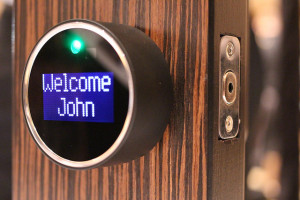
15207853585_b4bbec131a_z


Below are 3 common types of smart locks:

August Smart Lock


Available in Apple stores everywhere and thus arguably the most high-profile smart lock around, the stylish August Smart Lock can be a good solution if you want to use an existing deadbolt; adding the August Connect Wi-Fi adapter lets you share access easily and keep tabs on who comes and goes from wherever you are. It makes a lot of sense for renters or vacation-home owners, though we had a few quibbles: the battery compartment can slide off, and the auto-unlock feature was too unstable to be usable in urban environments, as it triggered a few times even when we were home. Another August add-on, the August Smart Keypad, which can be installed outside the house next to your door, allows for easier, smartphone-free access-sharing to guests. Once you figure in the expense though, some users might be better off simply buying a keypad-equipped deadbolt, such as our second-place pick, the Schlage Touchscreen Deadbolt. Source: TheWireCutter

Lockitron Bolt


The Lockitron fits over the thumb-turn on the deadbolt of a door. With the help of a smartphone, the lock can be opened remotely through a Web app or text message. It’s also equipped with GPS, which allows it to detect if someone is close by. This means you can easily open the door without having to search for keys or put down items like shopping bags. Other features include the ability to sync with any type of smartphone, the ability to sense a knock and send information as an alert to someone’s phone, the ability to track and be alerted when the door is locked or unlocked and to be alerted when someone is home. Source:  TechTimes

Goji Smart Lock

The Goji Smart Lock, with its own on-lock welcome screen, is packed with features. The device works both via Bluetooth for smartphone and fob proximity unlocking and via Wi-Fi for remote control functionality. No worries if you somehow lock yourself out without your phone – Goji maintains a customer service call center for lockout requests. Each Goji comes with 4 electronic keys and 2 mechanical backup keys. Source: Techlicious

It’s always important to keep our family and home safe. If you have any questions or need further assistance, please give us a call or contact us here.
3 Common Home Security Mistakes During Holidays

Holidays are time when people go out of town to spend time with their families. Whether you leave your home for a few hours or a few days, make sure you avoid these common home security mistakes during holiday season, such as: post-pile up, bushy landscape and social media.

11334584353_cab04d92c8_z


Below are 3 common home security mistakes during holidays:

Post Pile Up
Nothing alerts a burglar like mail overflowing from the mailbox, or newspapers piled up in your driveway. Stop mail and newspaper delivery while you’re out of town, and enlist a neighbor to pick up any packages or other deliveries that may arrive while you’re gone. Source: AlarmRelay

Bushy Landscape
Having leafy trees and untrimmed shrubs adds a wild side to your landscape, but you need to know that you are giving the burglar lots of rooms to maneuver and move around undetected. The thief won’t move only under the cover of darkness, but also during broad daylight since they have the advantage of shadows. Source: Ericabuteau

Social Media
The lights are off, the cars are gone, and mail, newspapers and packages have accumulated. This paints the perfect picture for an easy burglary target. When leaving for a vacation or business trip, consider what your vacant home will look like, and seek ways to maintain the appearance of an active home.

  • Ask neighbors or relatives to pick up the mail in your absence.
  • Invest in an energy management solution that allows you to schedule and remotely control lights within your home.  Source: VectorSecurity

Securing your home means more than just locking the doors when you leave. If you want to know more about home security services, please give us a call or contact us here.
3 Creative Places to Hide Your Home Security Cameras

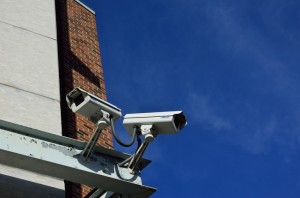
Hiding your security cameras in unique and creative places may give you the extra protection needed to help protect your home and family from theft. Here are 3 creative places to hide your home security cameras.

sc-300x300


In a Potted Plant
Get creative! Your camera will not be so easily spotted if you hide it inside a nondescript household object. Make sure to use something that you would usually keep in your room or office; an out-of-place object may arouse suspicion.
Consider hiding the camera in the leaves of a potted plant or deep in the recesses of a bookshelf–anywhere that someone will be unlikely to look closely. Make sure that the camera lens is pointing where you need it to point. Source: wikiHow

In a Bird Box
An ordinary bird nesting box can make a fantastic disguise for a camera. Choose a style that is completely enclosed, with just a small hole in the front for birds to enter and exit. The lens of a small bullet camera can sit just behind this hole, capturing everything that happens outside your property without being seen. If you are using a wired camera security system, then you will need to drill a hole in the rear of the box for the cables. A wireless security camera can simply be placed inside the box and connected wirelessly to the home security network. You can then mount the box on the side of your house or on a garden wall or fence. The advantage of using a bird box as a disguise, rather than a garden ornament or rock, is that you can use a high vantage point, which could give you a better view of intruders’ faces. Source: eBay

Under a Light Switch
We learned that it worked perfectly well with the iCam software and their tech support was familiar with this unit. It took all of 15 minutes to set it up via a web browser while being wired to our computer.
We made the square cut using an X-acto knife and got the power from our friendly AC outlet, snaked the wires through the opening and started working with the blank light switch plate template for the lens and status light’s openings.
This took a little bit of trial and error, but we finally found the perfect location. We used a regular hot glue gun to attach the camera (which we stripped from its pedestal base to minimize footprint) to the switch plate.  Source: ApartmentTherapy

3 Things You Should Know About Home Security Cameras

Choosing the right home security cameras can be confusing with hundreds of options to choose from but before you make a choice, here are some important things you should know about home security cameras, including: types, features and professional consultation.

hsc-768x508


Below are 3 things you should know about home security cameras:

Types
There is a wide variety of security cameras, and each one serves a different purpose. From fixed cameras to pan and tilt cameras, night vision cameras to motion detection cameras, there are security cameras for nearly every scenario.
When researching security cameras, keep in mind that many will have compound features, for example: “outdoor, night vision, pan and tilt cameras” or “fixed, dome IP cameras.” The list below will help you understand your options and pick the right camera for you. Source: SafeWise

Features
The chart above provides a side by side comparison of five DIY security cameras that are widely available today. As you can see, they share a lot of similarities, but there are also some subtle differences. Here’s a more in-depth comparison of what’s currently on the market.

  • Connectivity and power source
  • App
  • Video
  • Storage and subscriptions
  • Field of view
  • Price
  • Advanced features Source: Cnet

Professional Consultation
Every home is different and every family’s needs are different. That’s why you should have a professional security consultant take a look at your home and listen to your security goals so they can help you design a video surveillance system that works best for you and your home. Source:AckermanSecurity

If you want to know more about home security cameras, please give us call or contact us now!

Open Sentry Safe in less than 5 seconds at the Kitsilano Business Leaders Meetup.

Open Sentry Safe in less than 5 seconds at the Kitsilano Business Leaders Meetup.

Terry Whin-Yates from Mr. Locksmith demonstrated how easy it is to open a Sentry Electronic Safe is less than 5 seconds with no damage or “Signs of Entry” for the Kitsilano Business Leaders Meetup.

To purchase an excellent UL Listed Burgulary and Fire Resistant Safe for home or business that can not be opened in seconds visit Mr. Locksmith Safes.


For Hands-on and On-line  Locksmith Training go to Mr. Locksmith Training.

3 Things Your Kids Must Know about Home Security

When it comes to protecting your kids, we know you will want to have all your bases covered.  Luckily, these short post will cover 3 important things your kids must know about home security, including: security passwords, fire prevention and security alarm basics.

keychain-453500_960_720-300x200


Security Passwords
Explain to your kids that you are the only person who should know their passwords. Remind them that giving out their passwords to others (even to friends) can have major ramifications, like someone taking over their social media or email accounts. Source:  SafeWise.com

Fire Prevention
This is one of the most important things you can teach your kids. Teach them about fire prevention and how easily a lit flame can start a house fire. Keep them away from lighters and matches at all times. Make sure your child knows that they shouldn’t cook or use the stove or oven unless you’re right there with them. Tell them how easily grease fires can start a house fire. Teach kids to avoid electrical outlets and plugs and tuck away cords as much as possible. Make sure you have a home fire plan which includes dropping to the floor, holding a cloth over the mouth to avoid inhalation and avoiding hot door knobs and exits when this happens. For older kids, you can also teach them how to use an extinguisher. Source: BestHomeSecurityCompanys

Security Alarm Basics
If your home isn’t already equipped with a home security alarm system, it’s advised that you get one as soon as possible. This is especially critical if there are times when your children are unsupervised at home. At this point, there are a number of alarm systems available that are packed with features, even options that make it easier for children to use them. If you plan to purchase an alarm system, hire a certified and fully trained locksmith to install it. Once installed, it’s your job to teach your children exactly how the home alarm system works and how to use it. Source:Technofaq

3 Harmful Misconceptions About Home Invasions that You Should Know

There are a lot of harmful home burglary myths that can give a false sense of security. Luckily, this short article will cover some harmful misconception about home invasions that you should know. Read on!

Most Break-ins Occur at Night
A burglar will usually run away if the homeowner should come home or be inside the house. Home Invaders usually hit a home, at night or on weekends when someone is at home and security systems are deactivated. A home invasion is a situation where criminals will use force to get into a home with someone inside in order to rob or commit some other kind of crime. A home invasion is about gaining control of the home and the homeowner. Source: Bedgunsafe

Most Burglar Will Only Strike Once
Beware: It isn’t uncommon for a burglar to invade a home more than once. After all, they already know the layout of the house and have discovered where the “goodies” are kept. If you’re the victim of a break-in, get a home security ASAP to deter the bad guys from returning.

According to the FBI, the average dollar loss per burglary in the U.S. is $2,185. That amount far exceeds the cost of a basic home security system, and doesn’t include the emotional damage a break-in inflicts on your family. Plus, many insurance companies offer discounts on your homeowner’s policy when you have a home security system installed. When you couple the victim’s losses with criminal justice expenditures, a typical home invasion is estimated to cost nearly $20,000. Source: Safewise

Most Alarm Systems Are Expensive
If by expensive you mean less than $10 per month, then yes. There are many affordable options available for much less than you would think. Research the options and choose what works best for you and your family because money should never deter you from feeling safe and secure. Source:AlarmRelay

Making small changes to your daily mindset can pay big dividends in home invasion defense.

3 Main Reasons Your Family Needs a Wireless Home Security System

Thinking about getting a wireless home security system? If so, you will want to consider these 3 main reasons your family need a wireless home security system, including: minimizing break-ins, keeping your family safer and knowing what’s happening when you’re not there.

2294144289_a54db90ac5_z-300x199

Image Source: Flickr 


Minimizing Break-ins
The biggest reason a home owner should consider installing a home security system is that it offers protection to family members from intruders. According to “Securing Home and Business” by Simon Hakim/Erwin Blackstone, homes without security systems are 2.7 times more likely to be targeted by a burglar. This indicates that the mere presence of an alarm system is enough in most cases to protect the home and its occupants from break-in. In some cases, burglars may still target a home either knowingly or unknowingly when members of the family are inside. For the burglar who enters the home expecting it to be empty, finding members of the family inside can cause enough shock and panic to facilitate aggressive behavior. Having a security system in place often provides family members with enough warning to get to a safe location in our outside the home while the alarm system dispatches local authorities. For burglars that enter a home knowing that family members are inside, their intentions are often much more malicious and the home alarm system again serves as an early warning system and calls the authorities. Source:  Asecurelife

Keeping your Family Safer
Alarm.com systems use a secure cellular connection that is fast and reliable, enabling real-time awareness and alerts from your home, and combating many of the vulnerabilities you’ll find on other types of system. For example, there is no exposed phone or cable line to be cut from the outside of the house that would render a traditional system useless.
Traditional wired home security systems are also vulnerable when your power, phone or Internet service goes out.  Alarm.com’s wireless security system uses a secure, dedicated cellular connection and battery-powered back-up so that that an alarm will always be signaled in an emergency.  This also means that your home automation will still work: your lights can turn on to deter people, and your HVAC system can shut down in case of fire so you don’t blow smoke through the house.  Source:  Alarm

Knowing What’s Happening When You’re Not There
One of the biggest benefits to having a wireless home security system is that you can manage your system with your smartphone or tablet. You’ll be able to remotely disarm your system, if say, the dog walker or a handyman needs to get into your house (then arm it again when they leave).
Forget to turn the heat down when you left the house for a weekend away? Not a problem, an advanced home security system can do it for you. You can also set lights to go on and off—a great way to make it look like someone is home—from your smartphone while you’re away (if you forgot to program it in advance).
You can also use your home security system to do things like make sure your kids got home from school safe, or unlock the door for them if they forgot their keys. Technology provides so many perks to wireless home security systems. You’ll just want to have a backup power supply ready, in case you lose power. Source:  Alarmrelay

4 Common Home Security Mistakes to Avoid

There plenty of simple and avoidable mistake to remember when it comes to home security. In this short post we’ll discuss 4 common home security mistakes to avoid, including: leaving entrances unlocked, announcing your absence, using fake security equipment and neglecting to maintain your home security systems.

Leaving Entrances Unlocked
It is surprising that in 2012, 34 percent of burglaries in the United States occurred because of unlocked entrances. It may seem like an obvious concept, but many people neglect to lock up. Burglars use the front door most of the time, and sometimes the rear entrance. You should make sure you lock both, as well as any other entries into the house. Source: Home-security-monitoring-review.toptenreviews

Announcing your Absence
With so many people using Facebook, Twitter and other social sites, it can be easy to forget that you might be compromising your home’s security without even knowing it. Never announce an extended absence from your home or “check-in” at any location that could identify you as out of town. Doing so can make your house an easy target for a would-be thief. The same goes for leaving notes on the door for the mailman or delivery person. Source: Ackermansecurity

Using Fake Security Equipment
Many homeowners bluff their home security measures by using dummy equipment such as fake surveillance cameras to deter burglars. Similar to bogus home security yard signs and window decals, burglars can tell the difference between real and fake equipment. Save yourself the trouble and leave the junk for the dummies who use it.

A better alternative is to set up a security system that has the ability to deter crime and detect trouble. New home-control technology gives you the power to look in on what’s going on in your home from wherever you may be. Simply open an app on your smartphone and view a live feed from surveillance cameras around your home. You can also configure your system to send alerts to your smartphone if motion is detected or if other dangers occur, such as a house fire or flood. With this technology, you can confidently display a yard sign or window decal from your security company that will actually make burglars think twice about breaking in. Source: Alarm.org

Neglecting to Maintain Your Home Security System
Security equipment should be checked annually by a professional. While self-testing is a good practice, a professional can give you a more specific diagnosis of your system. Furthermore, you should inspect—and change the batteries of—smoke and carbon monoxide detectors annually. Ensuring proper functionality is easy: For most models, you simply have to press and hold the button labeled “test” until the alarm sounds. Source: VectorSecurity

3 Holiday Safety Tips to Keep Your Home Secure

Whether you are traveling to spend time with family or staying home, it is important to remember that Holidays can also be an exciting time for burglaries and break-ins. Read on, to learn some basic steps to ensure that this year’s holiday season is a joyous and safe one for you and your loved ones.

Below are 3 holiday safety tips to keep your home secure:

Secure All Doors and Windows

  • Keep doors locked at all times. This is true even when you are home, and even when it’s light out.
  • Keep your windows locked, even those on the second floor. Burglars DO have climbing skills.
  • Use door reinforcements and top-flight locks.
  • Keep the curtains and blinds closed. This will ensure that no one can take a peek at your valuables. Source: Robertsiciliano

Do Not Post your Holiday Travel Plans Online
Broadcasting the location or duration of your trip on social media sites like Facebook and Twitter can be dangerous. It may be something exciting you really want to share, but be aware that you are blatantly telling criminals, “I’m not home”. Source: Ackermansecurity

Install a Home Security System
Installing a monitored home security system offers a variety of benefits, not the least of which is it makes your home 300 percent less likely to be burglarized. Plus, many systems allow you to view real-time video of your home, right from your smartphone, tablet or other connected device, which can give you valuable peace of mind while travelling. Snow and holiday lawn ornaments can obstruct the view of your home security signs, so periodically check to be sure they are visible.Source: Safewise

Having a home security system is an effective defense against these risks; however additional precautionary methods are always encouraged to provide your home the highest level of protection.